

Start an agent
1
Open a new agent chat
In the OpenWork app sidebar, click + beside Agents. The agent opens a chat and asks what it should do.
2
Tell it the job
Say what to check, how often to check, and what to report. For example:
Call the agent Bug watcher and the routine Check #bugs. Every weekday at 9 AM, read #bugs in Slack and summarize new bug reports here. Never post in Slack.
3
Review the plan
Read the plan and the Start like this? card. Pick Yes, start if the job and schedule look right. Pick Change how often to revise the schedule or Something else to describe a different job.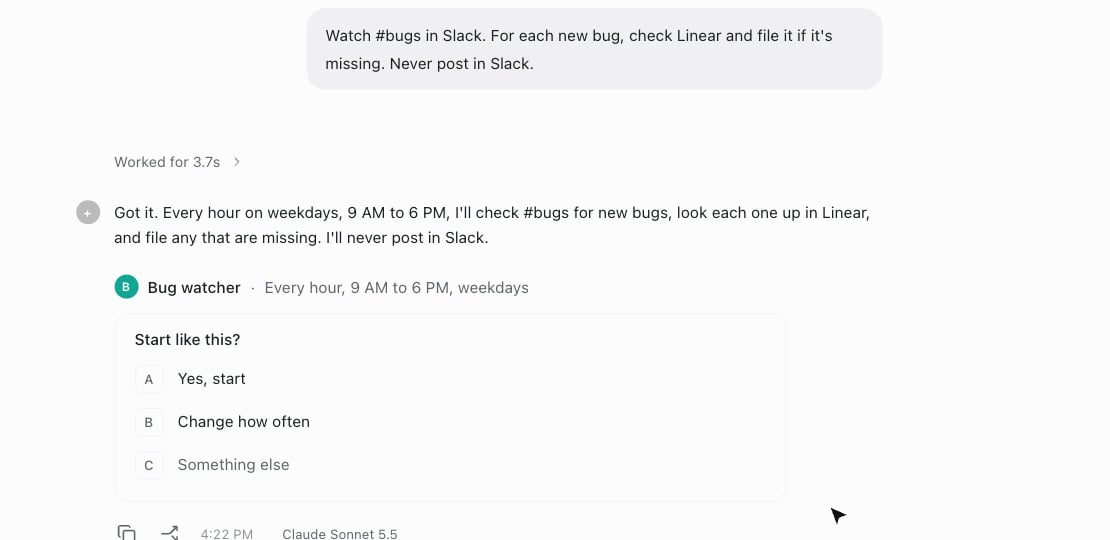
4
Read the first result
Yes, start creates the agent and its first routine, then requests a run. You don’t have to wait for the scheduled time. Look for the result below the chat messages.
Open the agent’s panel
Click the agent’s name at the top of its chat. The panel shows:- On means at least one routine is on. Off means none are on. The panel shows the next run if one is scheduled. If an admin paused the agent, it shows Paused by an admin instead.
- Routines lists what the agent runs and how often.
- Run now requests a run of the first routine shown. If that routine is already running, the next run waits in line. Up to five runs can wait per routine. The app tells you if the line is full.
- Share lets the owner or a manager give teammates access, if the organization allows them to share.
- Memory shows what the agent remembers from past runs.
- Settings shows what the agent can use and what it has spent.